
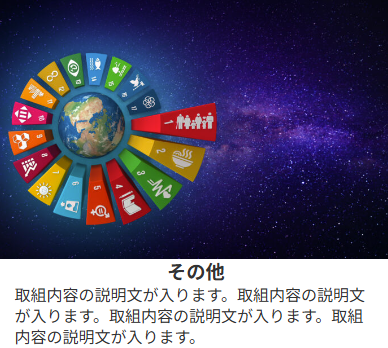

WordPressでサイト制作を行っていて、次のようにCSS上でキャプションを表示させていたのですが、WordPress6.7へバージョンアップしたからか、一部のキャプションが表示されなくなってしまいました。。。
■HTML構造
<figure class="wp-block-gallery> <!--ギャラリーブロックとして設定-->
    <figure class="image_button image_button_caption image_button_caption8"> <!--ギャラリー内の画像ブロック-->
        <a href="/sample/apply-form-8/"><img sample.png /><!--画像のリンク先-->
        </a>
    </figure>
</figure>
■CSS
/* 画像ボタン */
.image_button {
  display: block;
  position: relative;
  text-decoration: none;
  overflow: hidden;
	z-index:4;
}

.image_button a{
	color: #FFF;
	font-weight: bold;
	text-align: center;
	font-size: 24px;
  position: relative;
  z-index: 3; /* 文字を前面に表示 */
}

.image_button a:hover img {
  transform: scale(1.3);
	object-fit:cover;
	transition-duration: .5s;
}

.image_button a:hover:before {
  content: "";
  background: rgba(0,0,0,.5);
  position: absolute;
  top: 0;
  left: 0;
  width: 100%;
  height: 100%;
  z-index: 2; /* 背景色を文字の下に表示 */
}

.image_button a:hover:after {
  content: "次の画面に進む";
	white-space: pre-wrap;
	font-size: clamp(0.3rem, calc(0.2rem + 2.8vw), 2.4rem);
	position: absolute;
	top: 50%;
	left: 50%;
	transform: translate(-50%, -50%);
  z-index: 3; /* 文字を前面に表示 */
}

.image_button img {
  display: block;
  z-index: 1; /* 画像を最背面に表示 */
  position: relative;
}

/* キャプション要素を上から下に表示 */
.image_button_caption{
	display: flex;
  flex-direction: column;
}


.image_button_caption:before{
	content: "";
	background:#FFF;
	z-index:5;
	text-align:center;
	white-space: pre-wrap;
	font-size:clamp(0.3rem, calc(0.2rem + 2.0vw), 1.2rem);
	font-weight:bold;
	order: 1; /* 前に表示される */
	line-height:1.3;
}

.image_button_caption8:before{
	content: "その他";
}

.image_button_caption:after{
	content: "";
	text-align:left;
	white-space: pre-wrap;
	background:#FFF;
	z-index:5;
	order: 2; /* 後に表示される */
	padding:0px clamp(0.2rem, calc(0.1rem + 2.8vw), 0.9rem);
	font-size:clamp(0.1rem, calc(0.05rem + 2.0vw), 1.0rem);
	line-height:1.3;
}

.image_button_caption8:after{
	content: "取組内容の説明文が入ります。取組内容の説明文が入ります。取組内容の説明文が入ります。取組内容の説明文が入ります。";
}

/* ギャラリー画像サイズ統一 */
.wp-block-gallery.has-nested-images figure.wp-block-image {
    flex-grow: 0;
}
そもそも、CSSでキャプションを記述するなよという話だと言ってしまえば、その通りなのですが・・・
今回消失したのは上記例でいうと、なぜか次の部分のみだったんですよね。
.image_button_caption8:before{
	content: "その他";
}
そのため、構造上の問題ではない(例えば、より上位の部分で ~:before{content:””;}などの記述が追加された)と推測し、CSSを次のように修正したところ、正常に表示されるようになりました。
.image_button_caption8:before{
	content: "その他" !important;
}
ステージング環境で試しておいてよかったと思いました。WordPressのバージョンアップの際には気を付けないといけないと改めて心に刻み、ウェブサイト制作に取り組んでいこうと思います!

コメント